Rental Property Document Storage for Landlords
Keep landlord documents, dated notes and repair evidence with each property. See supported files, an example filing workflow and RentPilot screens.
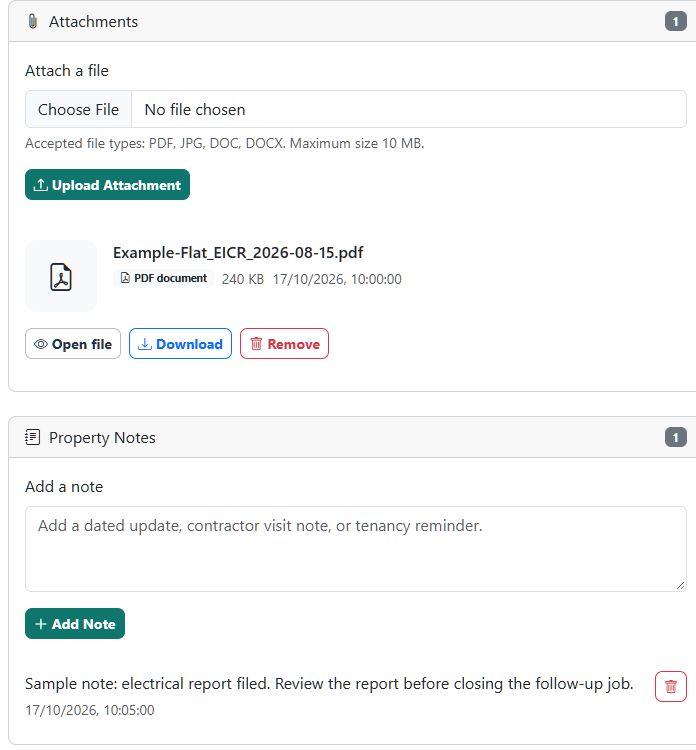
Keep each property's documents with its working records
RentPilot gives landlords in England a property record with attachments, dated notes and jobs. Use it to keep the evidence behind certificates, repairs and follow-up work close to the property it relates to.
This page describes document organisation for landlords with 1–30 properties. It is practical information, not legal advice or a claim that storing a file proves compliance.
What you can upload and find
The property attachment form accepts PDF, JPG/JPEG, DOC and DOCX files up to 10 MB per file. The property screen lists each attachment's original filename, file type, size and upload date, with actions to open or download it. Images can be previewed on the page.
Use property notes to record context, such as who supplied the document or which remedial job needs follow-up. Keep the relevant task and due date in the property's jobs rather than relying on a filename to remind you.
An example filing system
| Record | Example filename | Context to record |
|---|---|---|
| Gas safety record | Example-Flat_Gas-record_2026-09-01.pdf | Contractor, check date and any follow-up task |
| Electrical report | Example-Flat_EICR_2026-08-15.pdf | Report outcome and the remedial work to review |
| Repair evidence | Example-Flat_Repair-kitchen_2026-10-10.jpg | Job reference and what the photograph shows |
| Tenant document handover | Example-Flat_Handover_2026-10-01.pdf | Document version, delivery method and separate receipt evidence |
These are fictional naming examples. Use dates and descriptions from your own documents. Do not put passwords, identity numbers or unnecessary personal information in filenames.
Use a repeatable upload and review process
- Open the correct property and select Attach a file. Check the property name before uploading.
- Choose a supported file and confirm that its filename identifies the record clearly.
- Open or download the saved attachment to check that it is readable and complete.
- Add a dated property note for context and a job for any action or renewal that needs attention.
- When a new record arrives, give it a distinct filename. Decide which older evidence you still need before removing anything.
- During your regular review, check outstanding jobs against the documents actually received. Uploading a report alone does not complete remedial work.
The landlord document organisation guide gives a wider filing workflow. Use the tenant handover checklist when evidence needs to be supplied to a tenant.
Know what storage does and does not establish
RentPilot stores the files you upload. It does not verify their legal validity, replace professional inspections or automatically prove delivery to tenants. Keep evidence of service or acknowledgement separately where relevant.
The property attachment screen does not provide automatic document version control or a bulk spreadsheet import. Use distinct filenames and dated notes to explain changes. Choose retention periods appropriate to the record and your circumstances rather than applying one blanket period to every document.
Start with the England landlord compliance hub to identify the relevant workflows, or compare spreadsheets and property management software before choosing your approach.
Common questions
Can I upload a spreadsheet?
The property attachment form currently accepts PDF, JPG/JPEG, DOC and DOCX. Keep your working spreadsheet separately or export the relevant record as a PDF for attachment. Review the exported copy before relying on it.
Does uploading a document send it to my tenant?
No. Storage on the property record does not establish that the tenant received it. Follow your document handover process and retain the delivery evidence you need.
What should I do when a document changes?
Upload the new file with a clear date or version in its name, note what changed and review any linked task. Keep earlier evidence where it is still needed.
Explore RentPilot features or create an account to try the workflow with one property first.
Last reviewed: 2026-10-17
Simple pricing and value
RentPilot starts from 99p and is designed to be affordable for single-property and portfolio landlords who need practical compliance workflows.